A profile people can find
A common starting point for your interests, professional presence and participation.
Your connection to the property story
Own property, provide professional services, or follow the projects shaping your community. Your FolioProjects profile connects you to the property information and activity that matters to you.
One profile. Choose how you participate.
Choose your starting point
Select a path to see how your profile can help.
You can use all three paths.
For owners & investors
Bring reports, permits, invoices and maintenance records into a property workspace. Connect the work to projects, and use your profile as the starting point for your involvement.
When you choose to showcase a property or share a Snapshot, make selected information available without treating every working document as public.
Property subscriptions and Snapshot purchases are separate from your profile. See pricing.
For professionals & service providers
Realtors, lawyers, contractors, property managers and consultants use the same profile system as everyone else. Establish your presence and participate in project work when invited or authorized.
Review what a client explicitly shares with you and keep the relationship connected to the work, without assuming access to their private records.
Examples of how existing shared information and project tools can be used:
A profile is not a verification of qualifications or an endorsement. Visibility does not guarantee inquiries or referrals.
For neighbours & interested stakeholders
Explore public projects and published Snapshots to understand the information a project team has chosen to share. Follow profiles of interest and take part in discussion or polls where those features are available.
A rezoning proposal is one example: review the published material, consider the questions being raised and participate through the options the project provides.
Following a profile does not give you permission to access its private property records.
How it fits together
A common starting point for your interests, professional presence and participation.
Properties, projects and portfolios give information a place and purpose. Access follows the permissions on those records.
Public records and selected Snapshot publications give visitors an entry point into information you choose to make available.
See the real interface
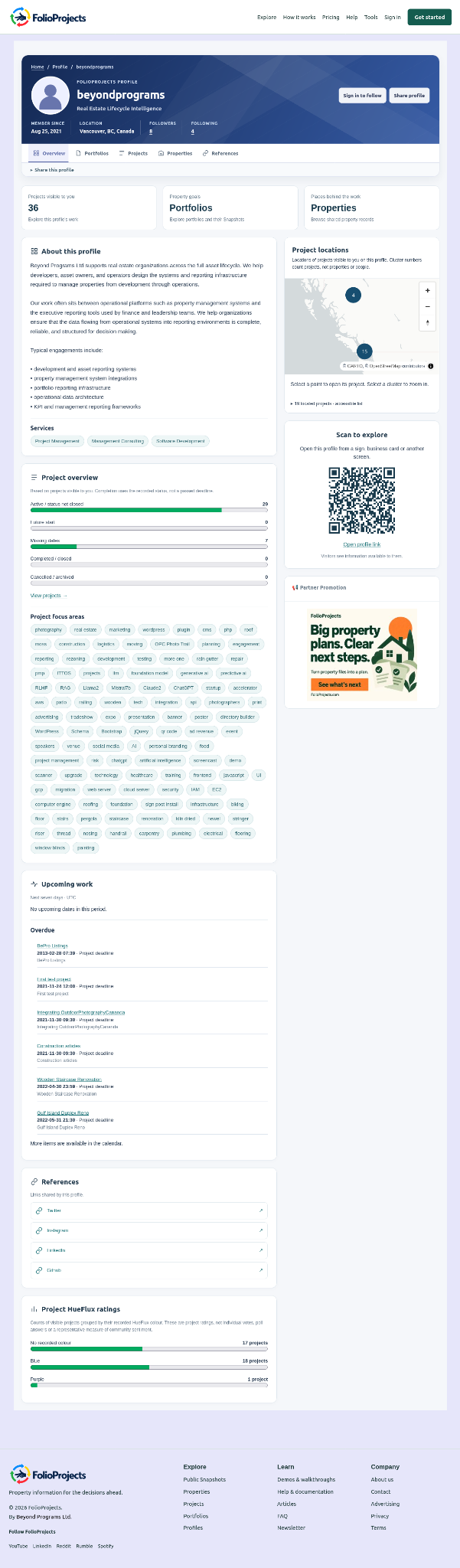
The Beyond Programs profile, shown while logged out. The screenshot demonstrates what a visitor can see on this particular public profile.
The profile introduction and service tags explain what Beyond Programs offers.
Profile tabs and the project overview help visitors explore the visible work. The map shows project locations.
The sign-in-to-follow button, share control and QR code give visitors ways to connect with this profile.
Participation with boundaries
Decide what to publish, what to share and who participates in the underlying work.
Start where you are
One account can participate in more than one way.